
Parcel Tycoon Trucks: Depot Role & Driving, Explained
Trucks in Parcel Tycoon are a depot buildable and a drivable vehicle class. What the game's own descriptions confirm about trucks — and what they leave unpublished.
Trucks in Parcel Tycoon are documented in two separate roles: a piece of the depot you build, and a vehicle you drive. The game's official feature list puts trucks inside the build set — "BUILD YOUR DEPOT: walls, conveyors with old school tycoon upgraders, trucks, a loading dock, a pallet bay, and a loft that goes from mattress-on-the-floor to marble penthouse" — while the [BETA] experience description separately makes them drivable: "Drive scooters, vans and trucks through the city, the beach and the harbor." What neither text publishes is a price, an unlock stage, or a list of effects, so this guide sticks to what's confirmed and tells you exactly what to check in your own depot.
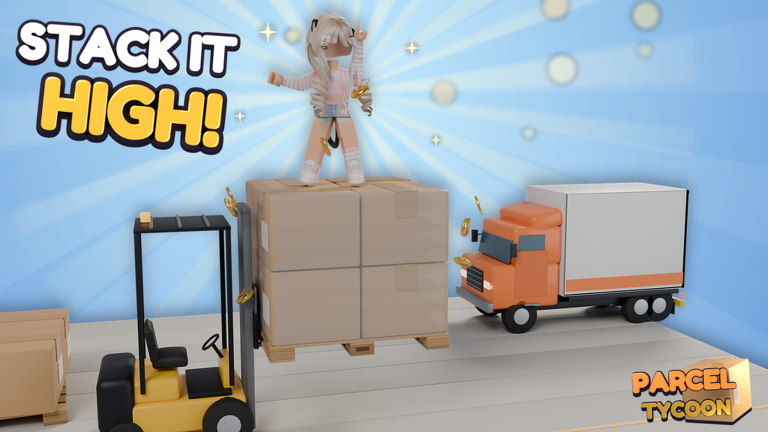
Trucks are part of the depot build set
The "BUILD YOUR DEPOT" bullet is the game's own feature summary, and it treats a truck as depot infrastructure. It sits in the same breath as walls, conveyors with old school tycoon upgraders, the loading dock, the pallet bay and the loft — so a truck is something your depot is built from, not a separate vehicle shop with its own unlock system.
It's a summary, though. The bullet names trucks as a component and nothing more: no build order, no cost, and no interaction details for trucks or any other part on the list. For the wider build path — and the conveyors named in the same line — see the Parcel Tycoon depot upgrades and conveyors guides.
Trucks are also a drivable vehicle class
The [BETA] experience description lists driving as a headline feature: "Drive scooters, vans and trucks through the city, the beach and the harbor." Trucks are one of three road vehicles named there, with the city, beach and harbor as the named driving areas.
Driving is baked into the core loop: "Start with a tiny garage, one shelf and a scooter. Grab orders from the printer, pack them, slap on a label and deliver them across the city. Deliver fast for big tips, then spend your cash to grow!" You begin deliveries on a scooter, and bigger vehicles are part of the growth the description advertises. The same text presents the rest of the vehicle lineup as hands-on — "Captain your own container ship," "Fly cargo planes," "Launch rockets ... and land the rocket yourself" — which fits vehicles being driven by you rather than decoration or automation.
One honest limit: this comes from the game's own description text rather than captured gameplay. It confirms that driving exists and includes trucks, but the descriptions don't document controls, routes, or any handling difference between trucks, vans and scooters. For the delivery loop itself — printing, packing, labeling and shipping — see how to ship parcels.
Getting a truck: what's confirmed and what isn't
The verified frame for acquisition:
- Trucks belong to the depot build set, so access runs through depot construction rather than a separate unlock screen.
- The published progression is cash-driven: "Deliver fast for big tips, then spend your cash to grow!" You start with a tiny garage, one shelf and a scooter (beginner start) and grow by shipping — with the bank taking a cut along the way: "The bank wants 30% of everything you ship."
That's where the documented trail ends. The game's own descriptions never name the button or build option that produces a truck, a Money cost, a prerequisite stage, where the truck is placed, or how you confirm it's finished. Anyone quoting an exact truck price or unlock level for this game is citing something the official copy doesn't say, so treat specific numbers with suspicion.
The practical route is the one the game describes: keep orders moving so tips and payments pile up (how to make money), build out the depot as cash allows, and when trucks appear among your depot build options, open the build menu and read what the game itself says about them — that in-game description is the one source that outranks any guide. Before saving for a big purchase, it's also worth a quick check of the codes page for anything currently running.
What isn't established about trucks
- No mechanical effect is documented. Nothing in the game's copy says a depot truck adds cargo capacity, unlocks new delivery zones or automates deliveries. Those effects may exist in-game, but they aren't established.
- No truck-vs-van comparison is documented. Trucks aren't confirmed to be faster, bigger or better than vans — the descriptions name them side by side with no differences stated.
- The two roles aren't proven to be one truck. The depot-buildable truck comes from the listing's build-set bullet, and the drivable truck from the [BETA] description — two different texts that aren't confirmed to describe the same version of the game, let alone the same vehicle. Treat them as two separate facts.
Quick recap
| Question | What the game's own copy supports |
|---|---|
| Is the truck part of the depot build set? | Yes — named in "BUILD YOUR DEPOT" alongside walls, conveyors, a loading dock, a pallet bay and the loft |
| Can you drive a truck? | Yes — "Drive scooters, vans and trucks through the city, the beach and the harbor" |
| How much does a truck cost, and when does it unlock? | Not published in the game's descriptions |
| What does a built truck add to the operation? | Not published — no capacity, zone or automation effects are documented |
| Do trucks handle differently from vans or scooters? | Not published |
The game ships "New updates all the time!", so truck details can change or get clearer at any point — the updates page is where new feature changes are recorded.